
Step by Step Application Process
Pacific Dental Conference - March 4-6, 2027
Home Page
- Visit the PDC website – www.pacificdentalconference.com
- From the home page, click the pink PURCHASE BOOTH button under the Exhibitors section.
- Note: The buttons will appear on October 30, 2025, at 9:00 AM PDT
⚠️ Important for 2026:
- All exhibitors must create new accounts (no old accounts supported).
- Account creation and requests open October 30, 2025, at 9:00 AM PDT. Early setup is not allowed.

Step 1 - Company Information
Complete Required Fields
- Fill in all fields marked with a red asterisk (*)
- Click the yellow Continue button to proceed.

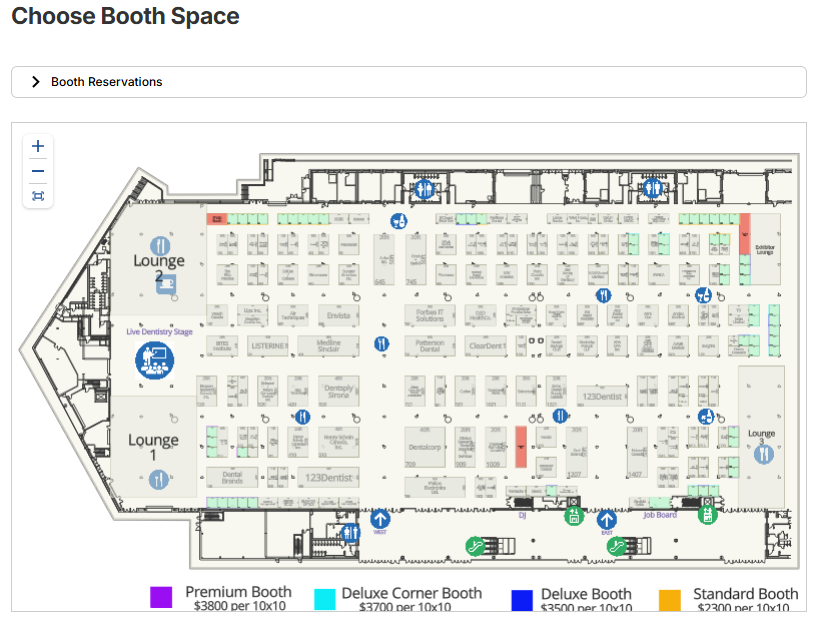
Step 3 - Choose Booth Space
Select Booth Spaces on the Map
- Click an available booth space to see details: booth number, type, size, and area.
Note: Green Booths are available to purchase - Click Add Booth to include it in your request.
- Click the yellow Continue button to proceed.

Step 4 - Confirm Order and Sign Terms and Conditions
Review Before Submission
- Company and Contact Details:
Verify your organization name, address, and contact info are correct. - Booth Selections:
Confirm the booth type, number, booth numbers, and total price match your order.
Sign and Submit Agreement – Required
- Sign in the signature box and enter your printed name and title.
- Check the box confirming your authority to agree to the terms.
- Review carefully—submissions cannot be changed.
- Click Continue to submit or Back to return.


Step 5 - Full Payment Due
Payment Instructions
- Scroll down to the Make Payment section.
- Enter your credit card details securely (fields not shown).
- Click Process Payment to complete. Booth is not confirmed until full payment is made.
